Your first 30 days with the PowerShot V1.
Set it up, get it sharp, make exposure click. The settings to change first, the buttons worth moving, and a ten-minute-a-day plan that turns the menus into habits.
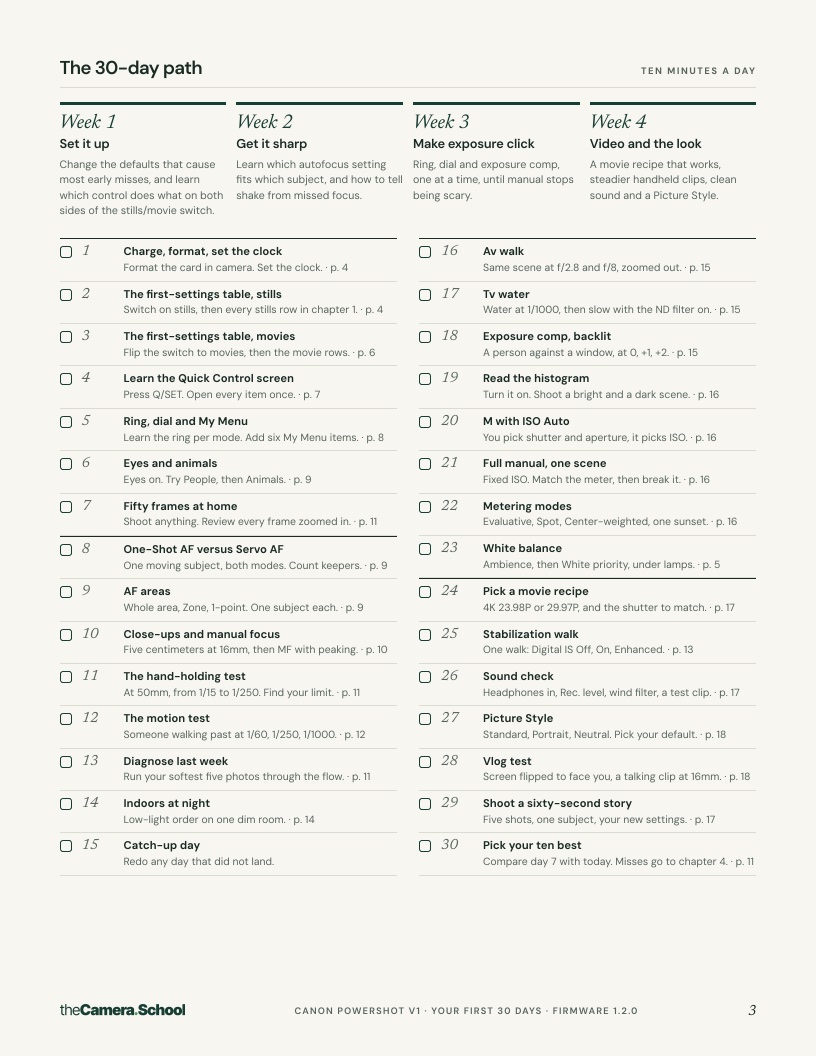
- 20-page PDF, eight chapters and a 30-day checklist
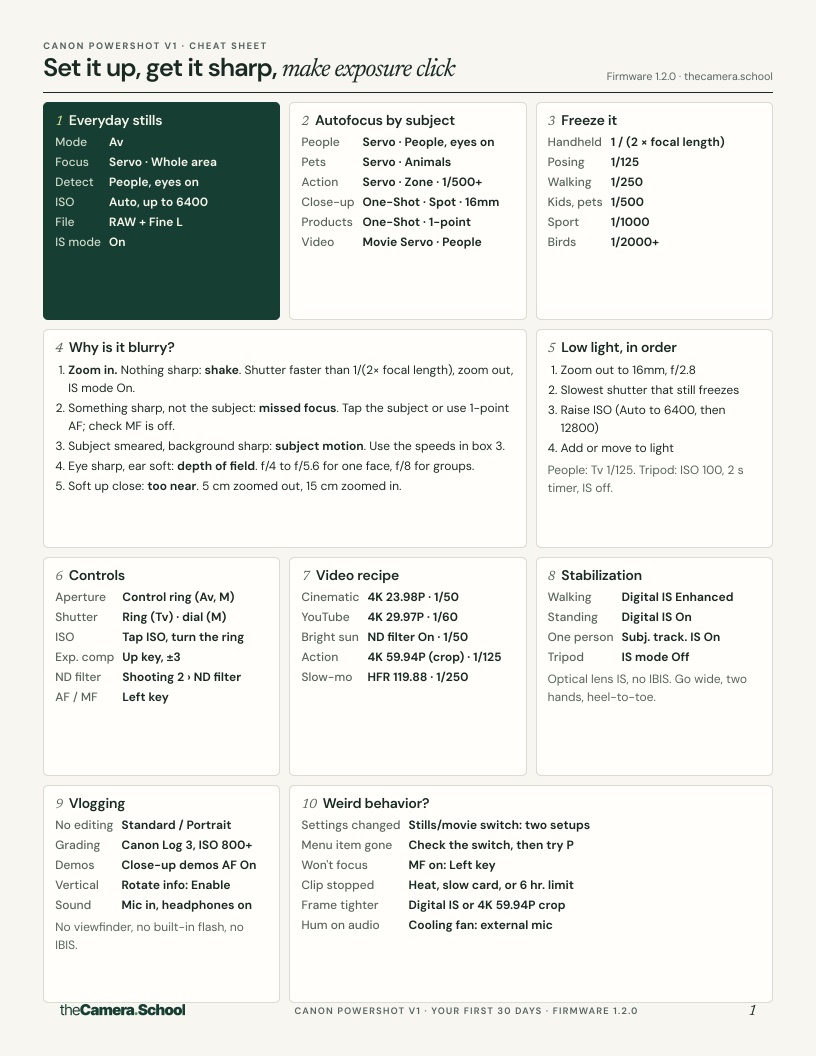
- One-page cheat sheet to print and keep in your bag
- Phone wallpaper with the settings you'll forget
- Every menu path checked against Canon's official manual for firmware Ver. 1.2.0
Secure checkout by Stripe. Download link by email straight after payment. Refund policy.
Eight chapters, in the order you'll need them
Written for the PowerShot V1 specifically: its buttons, its menu names, its quirks.
- 1
The settings to change first
Every default worth changing, with the exact menu path on your body.
- 2
Buttons, Fn menu and My Menu
A layout that puts what you change most under your thumb.
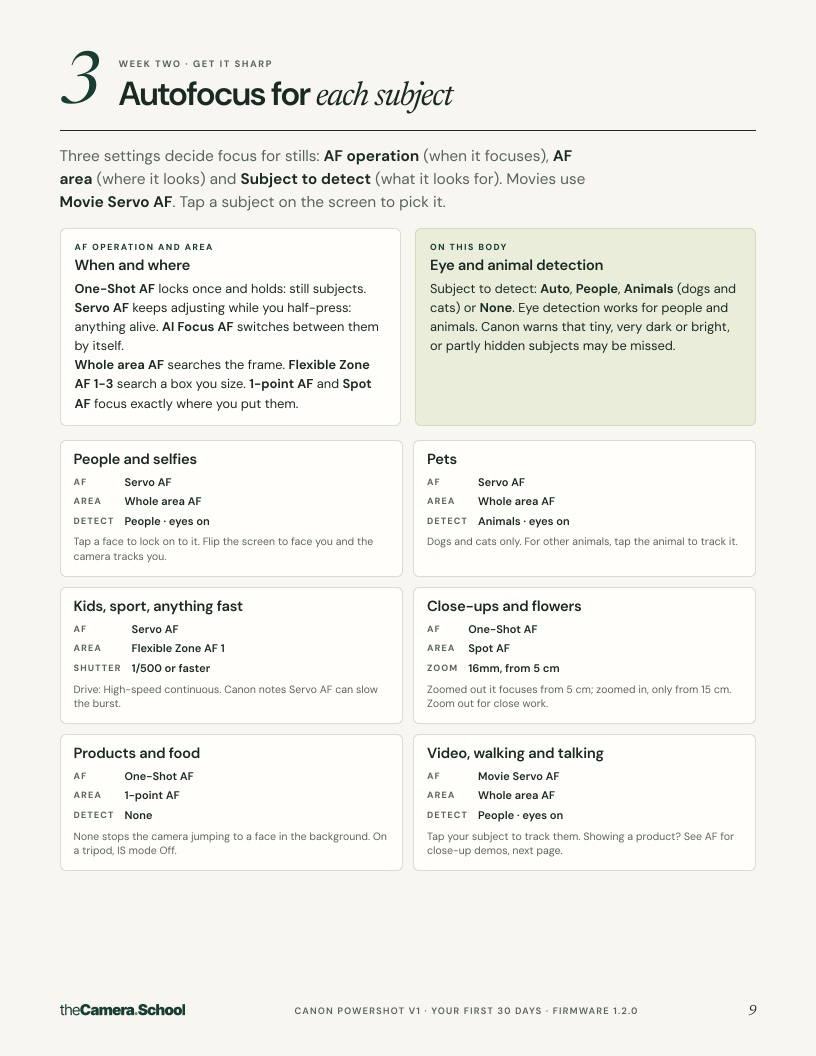
- 3
Autofocus for each subject
Which focus mode and area for people, pets, action, products and video.
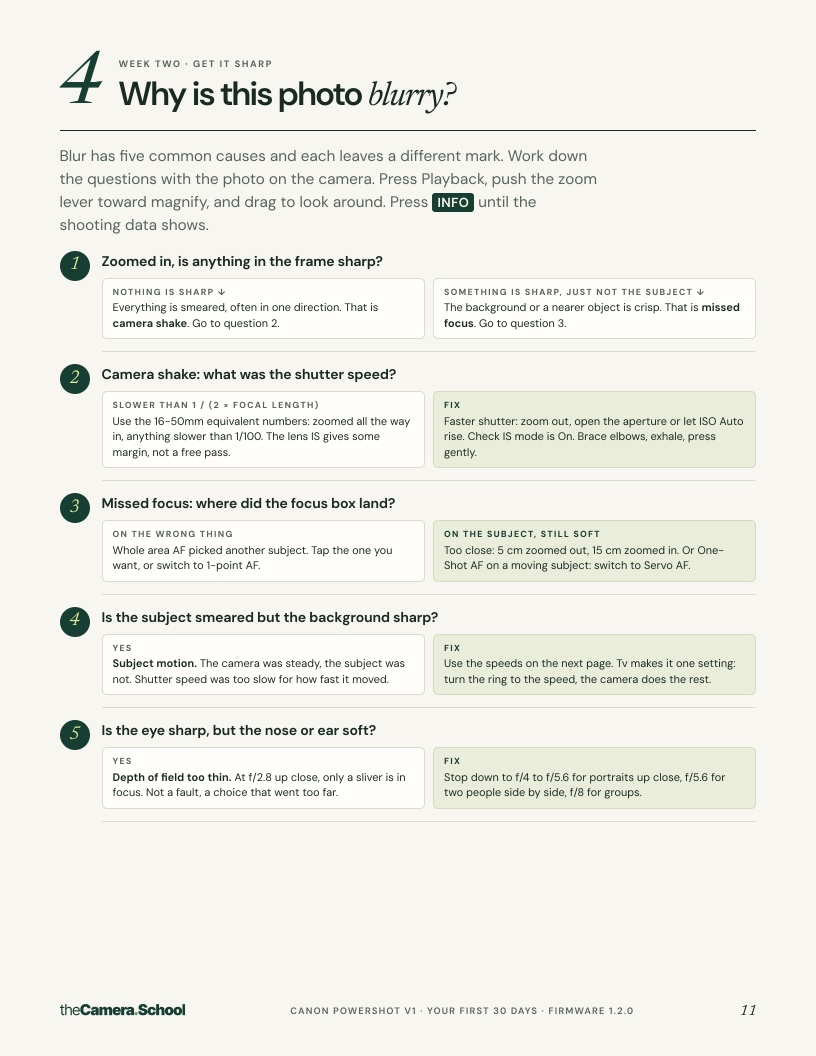
- 4
Why is this photo blurry?
A five-question diagnosis: shake, missed focus, motion or depth of field, and the fix for each.
- 5
Stabilization and shaky video
What each stabilization setting does on this body, and handheld technique.
- 6
Low light
The order to give up settings when the light goes, and what your camera can do in the dark.
- 7
Exposure that clicks
A short path from Auto to Manual on your camera's own dials and buttons.
- 8
Video recipe and picture profiles
Frame rates, shutter, sound, and the picture profile that fits how you edit.
The add-on for when the basics click
Same camera, same checked menu paths. $39 for the pack and the add-on together.
- +1
Saved setups
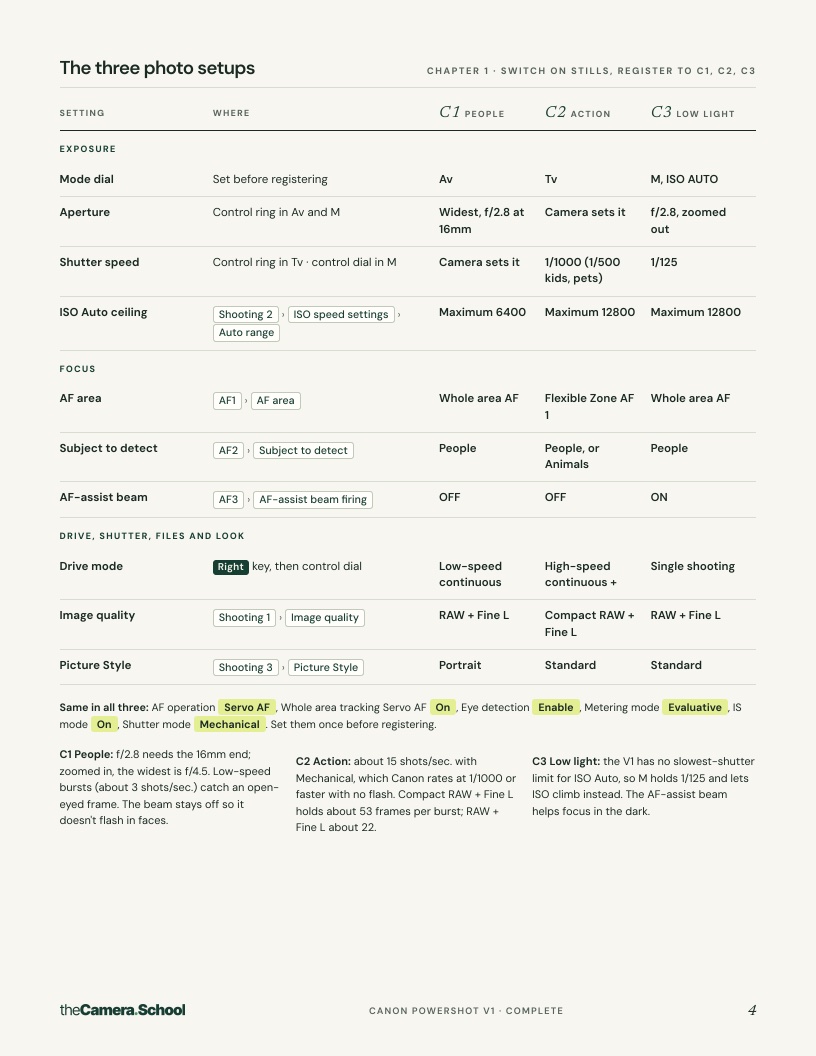
Three complete setups saved to the camera, for people, action and low light, so one turn of the dial changes everything.
- +2
Shoot recipes
A settings table for each common job: portraits, indoor events, kids and pets, sport, travel, interiors, products and night.
- +3
Video in depth
Three full video setups, sound, recording formats and cards, heat and long takes, and switching between photo and video fast.
- +4
Cards, backup and firmware
A card and backup routine, firmware updates, and starting flash settings on bodies with a flash shoe.
- +5
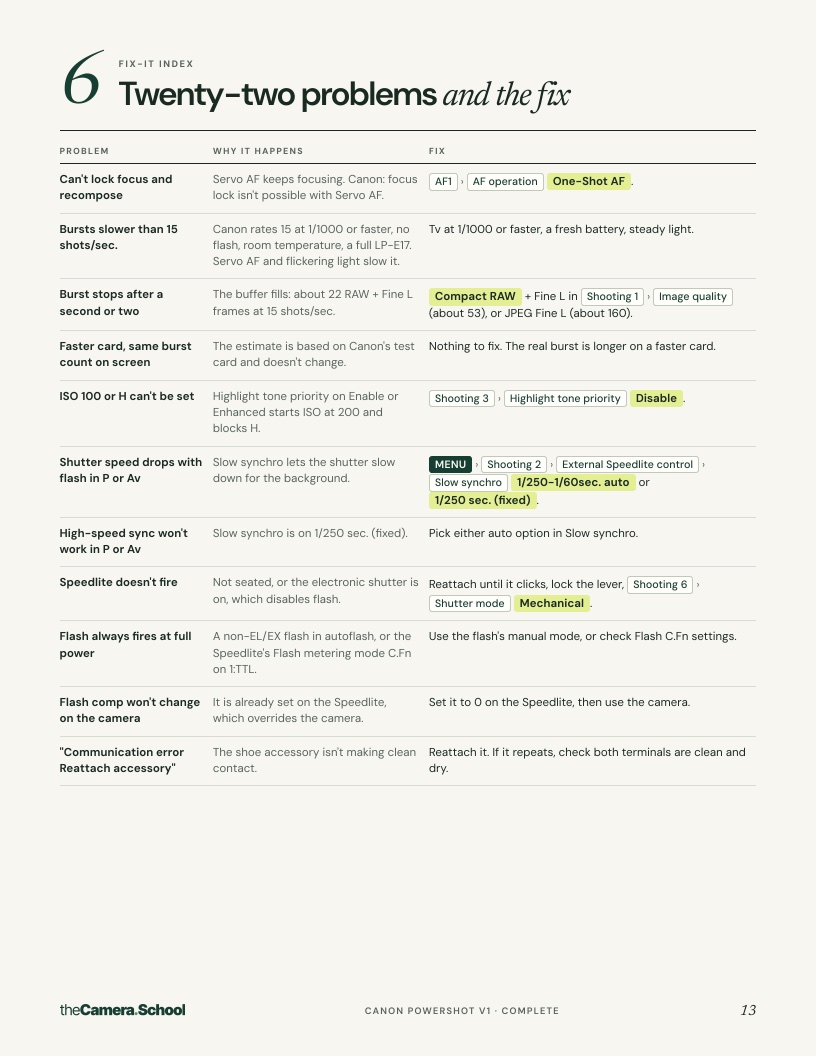
Troubleshooting index
About twenty common problems, each with the cause and the fix with its menu path.
Designed to keep open beside the camera
What PowerShot V1 owners say
This is for you if
- You own a PowerShot V1 and the menus still feel like guesswork
- Your photos come out soft and you can't tell why
- You've watched the exposure videos and it still hasn't clicked
- You'd rather follow a short plan than a 20-hour course
It's not for you if
- You already have your own custom setup you trust
- You want a full editing or color grading course
- You're looking for a different camera: the pack is specific to the PowerShot V1
Questions
What exactly do I get?
A zip file with three things: the 20-page pack as a PDF, a one-page cheat sheet PDF made to print, and a phone wallpaper image. The download link arrives by email right after payment.
Is this just the manual rewritten?
No. The manual tells you what every setting does. The pack tells you which ones to change, in what order, for which subject, and how to tell from a blurry photo which setting caused it. The manual is what every menu path is checked against.
Which firmware does it cover?
Firmware Ver. 1.2.0, the latest when the pack was checked. If a firmware update changes a menu, the pack is updated and buyers can download the new version with the same email.
What if my link expires?
Links work for 7 days. Get a fresh one any time at thecamera.school/packs/resend with the email you bought with.
Can I get a refund?
Because the pack is an instant download, sales are final once it's downloaded. If you were charged twice, the download doesn't work, or you bought the wrong camera's pack, it gets fixed: see the refund policy.
Is there anything free?
Yes. The Canon PowerShot V1 guides are free and cover a lot of the same ground in more depth, one topic at a time.
Start your first 30 days with the PowerShot V1.
Secure checkout by Stripe. Download link by email straight after payment. Refund policy.